
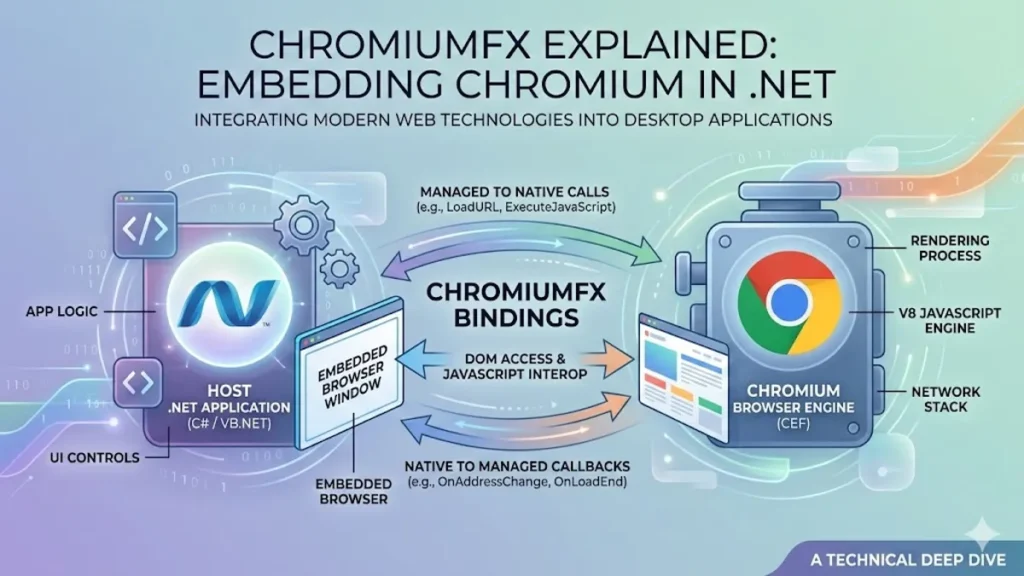

ChromiumFX is a .NET framework that embeds Chromium browser capabilities into desktop applications by binding to the Chromium Embedded Framework, better known as CEF. For developers building Windows, macOS, or Linux desktop software that must display modern web content, run JavaScript, and still live inside native UI, ChromiumFX offers a pragmatic bridge: it wraps CEF’s native API in managed .NET types, and it does so with an eye toward reducing boilerplate and making cross process interoperability less treacherous.
I have watched “hybrid desktop” shift from a buzzword into a budget line item. Teams want one UI layer, one design system, and one place to ship changes quickly. The web stack, with HTML, CSS, and JavaScript, is the obvious candidate, but the choice of container has consequences. Electron is powerful yet heavyweight. WebView2 is convenient but tied to Microsoft’s ecosystem. CEF remains the classic option when you need deep control, off screen rendering, custom request handling, and predictable embedding behavior across platforms.
ChromiumFX sits in that gap. It is not a browser product. It is a binding layer that tries to make CEF usable from C# without forcing developers to live in C++ land. Its story is also a story about desktop software today: you can build “native” experiences while increasingly relying on a multi process web engine whose security posture depends on relentless updates.
The Hybrid Desktop Bargain
Embedding Chromium is often less about browsing and more about rendering. A trading dashboard, a medical device console, a game launcher, or an internal admin tool might need a complex UI, fast iteration, and a modern JavaScript runtime. CEF exists to make that embedding possible, insulating developers from Chromium’s internal churn while still exposing stable APIs and release branches aligned to Chromium versions.
ChromiumFX inherits the bargain CEF offers, then adds a second bargain: you can stay in .NET while driving a native engine. Its pitch is partly ergonomic. CEF’s surface area is large, and its multi process model means that “simple” features like scripting, DOM access, or devtools hooks can cross process boundaries. ChromiumFX’s project description emphasizes a managed wrapper for the full CEF API and a “remote wrapper” for accessing DOM and V8 from the browser process.
The result is a toolchain that feels less like building a browser and more like adding a web powered view to an application that already has opinions about windowing, plugins, and deployment. That difference matters when you are trying to ship something boring and reliable, which is what most desktop software is paid to be.
Read: PKHeX Guide: Editing Pokémon Save Files Safely
ChromiumFX in Plain Terms
ChromiumFX is best understood as a binding layer. CEF itself is a C and C++ oriented embedding framework. ChromiumFX maps those native concepts into .NET, providing classes and handlers that let C# code react to navigation events, manage resource loading, work with cookies, and coordinate browser lifecycle callbacks.
Forks and mirrors help keep it usable across specific CEF branches. The prepare/ChromiumFX repository, for example, describes a 3.2171 branch that backports features while targeting the CEF 3.2171 API, and it explicitly urges users of that branch to upgrade due to important bug fixes.
There is also jonny-novikov/ChromiumFx, described as .NET bindings for CEF, which highlights a key operational reality: these bindings need to verify they are paired with compatible native binaries. That repository notes API hash verification for the loaded libcef.dll to fail early when CEF binaries are incompatible.
In practice, ChromiumFX is less a single monolithic “product” and more an ecosystem of bindings, branches, and compatibility discipline, all organized around the moving target that is Chromium.
Why Multi Process Architecture Shapes Everything
The moment you embed Chromium, you adopt its multi process worldview. Chromium’s own design documentation frames the motivation clearly: “Chromium uses multiple processes to protect the overall application from bugs and glitches in the rendering engine.” That separation improves stability and security isolation, but it changes how your application is built.
CEF follows the same conceptual model. Processes are spawned to handle rendering and other roles, and hosts can configure a separate subprocess executable if spawning the main application is too heavy or unsuitable. In a CEF forum explanation of CefExecuteProcess, one post notes that the main application executable “will be spawned multiple times to represent separate processes,” controlled via command line flags.
ChromiumFX has to make that reality tolerable in .NET. Its README notes changes around process execution, including that CfxRuntime.ExecuteProcess behavior evolved to handle remote connection requirements transparently in the render process.
This is where a wrapper can either help or harm. A good wrapper makes the multi process model explicit but not painful. A bad wrapper makes it invisible until production, when an architecture mismatch, a missing native dependency, or a subprocess path misconfiguration crashes the entire app.
Off Screen Rendering and the Quiet Power of “Windowless”
Most people think of embedded browsers as rectangles on a form. Off screen rendering, or OSR, is the feature that turns Chromium into a graphics component. With OSR, the engine renders into buffers you can paint into a custom UI, a texture, or a game engine pipeline.
CEF’s forum documentation describes OSR as “an extension of general CEF usage,” where you set the render size and receive paint notifications, then feed user input events back into the browser via send methods. Modern CEF issue tracking also treats OSR as a first class capability, discussing OSR support via windowless configuration and render handlers.
ChromiumFX’s appeal in certain desktop niches comes from making these advanced embedding paths accessible from managed code. Off screen rendering is how you build headless automation tools, in app previews, or UI that composites web content with native rendering layers. It is also how you avoid common WPF “airspace” conflicts that appear when you embed HWND based components inside a vector rendered UI.
This is the moment where “it is just a web view” becomes “it is a rendering subsystem,” and where wrapper ergonomics start to matter as much as raw engine capability.
The Interop Question: JavaScript Meets .NET
A browser engine inside a desktop app is often there to run business logic in JavaScript, or to share UI code with a web product. The bridge is everything. ChromiumFX’s project overview emphasizes a remote wrapper for access to DOM and V8 across processes, which is a direct response to CEF’s reality: the DOM and JavaScript engine live primarily in the render process.
Even outside CEF, the modern interop pattern is consistent. Developers call JavaScript from managed code, and JavaScript calls back into managed handlers. Microsoft’s WebView2 ecosystem describes this as a core feature, framing it as calling JavaScript and manipulating DOM from .NET and receiving callbacks from scripts.
The conceptual challenge is not “can I call JavaScript,” but “can I do it safely and predictably without leaking objects, deadlocking threads, or crossing process boundaries incorrectly.” ChromiumFX’s approach is to push more of that complexity into managed abstractions. That can reduce boilerplate, but it also raises the bar for version matching and binary discipline, because interop layers are where mismatches become crashes.
A Compatibility Culture: Versions, Architecture, and Early Failure
Every CEF based stack eventually becomes a lesson in binaries. It is not enough to compile. You must align the CPU architecture, ensure native dependencies are present, and match the wrapper’s expected CEF API.
ChromiumFx bindings discuss verifying the API hash of libcef.dll at startup so the application fails early if it loads incompatible CEF binaries. That is a defensive posture, and it is a good one. Silent incompatibility can produce intermittent crashes that look like threading bugs when the real cause is version drift.
The prepare/ChromiumFX branch narrative reinforces the same point from another angle. It describes backporting features while targeting a specific CEF API branch and stresses upgrades due to bug fixes.
The practical implication is that ChromiumFX teams often keep a compatibility matrix in their build documentation. They pin a specific CEF build, a specific wrapper commit, and a specific set of native redistribution steps. The “easy” part is writing C#. The hard part is shipping a stable web engine inside a desktop installer.
ChromiumFX Versus CefSharp, the Familiar Alternative
In .NET land, the most recognized CEF wrapper is CefSharp. Its repository describes itself as “a lightweight .NET wrapper around the Chromium Embedded Framework,” providing WPF and WinForms browser controls, with a portion of bindings written in C++/CLI. The CefSharp project site emphasizes its open source nature and BSD licensing, which is attractive for proprietary applications.
ChromiumFX, by contrast, tends to feel closer to raw CEF concepts, with its emphasis on full API coverage and remote access layers. That difference can be philosophical. Some teams want high level controls and a broad community of examples. Others want conservative bindings and a clear mental model of what CEF is doing.
A useful way to frame the decision is to compare typical selection factors:
| Factor | ChromiumFX | CefSharp |
|---|---|---|
| Primary posture | Full CEF bindings plus remote DOM and V8 access layer | Higher level controls for WPF and WinForms |
| Community footprint | More niche, often fork driven | Broad usage and documentation ecosystem |
| Failure mode | Sensitive to version matching and native binaries | Also sensitive, but many turnkey samples exist |
| Best fit | Hybrid apps needing deeper CEF level hooks | General purpose embedded browser controls |
Neither choice is “best.” The choice is about how much control you need, and how much complexity you can afford to own.
WebView2, Electron, and the Updated Landscape
It is impossible to discuss Chromium embedding in 2026 without acknowledging that Microsoft’s WebView2 shifted the baseline for Windows developers. WebView2 offers a Chromium based control that can be updated via the Evergreen runtime, and it includes first class .NET to JavaScript interop patterns. The tradeoff is control and portability. WebView2 is a Windows centered bet, and some advanced CEF embedding paths, like custom subprocess architectures or OSR, are not the same experience.
Electron, meanwhile, offers a full app shell with Node.js integration, but its “app as a browser” posture can be heavy for plugin style integration or for products that need tight control over processes and resource use. CEF remains a favorite where teams want embedding, not a web app container.
ChromiumFX fits into this landscape as a CEF route for .NET developers who prefer explicit control and cross platform possibility, even if the operational burden is higher. It is often chosen by teams who already know what they are signing up for.
The Security Pressure: Shipping Chromium Means Updating Chromium
A browser engine is a security surface, full stop. CEF maintainers have been direct about this in discussions about shared installs and update strategies. One CEF issue notes that apps running older CEF or Chromium versions “may have known vulnerabilities that put the user’s computer or data at risk.” It is an unglamorous truth: embedding Chromium obligates you to keep pace with upstream security fixes.
This pressure shapes architectural decisions. Some vendors isolate the embedded browser behind strict network policies. Others disable unneeded features. Still others try to centralize updates across products. But the simplest mitigation is disciplined version upgrades.
Here, wrapper projects and forks matter. A maintained branch like prepare/ChromiumFX that backports fixes to a specific CEF API line is not just about features, it is about keeping apps from being stranded on vulnerable engines.
Security becomes a product management responsibility. If you embed Chromium, you are now in the browser business, even if your product is a medical scheduling tool or a warehouse console.
Real World Uses: When Web UI Meets Native Expectations
The most common ChromiumFX use cases are not flashy. They are pragmatic. WPF applications that need modern HTML charts. Legacy enterprise apps that need authentication flows that Internet Explorer based controls cannot handle. Plugin scenarios where you want to display web content inside a host that already has strict UI constraints.
Stack Overflow threads referencing ChromiumFX reveal how developers encounter it: not as an ideology, but as a solution to a friction point, like multi tab behavior or inter process communication questions. In these scenarios, ChromiumFX’s value is often in event handling and lifecycle management, letting .NET code respond to navigation, frame load events, resource interception, and devtools integration, without forcing a deep CEF C++ rewrite.
In industries like gaming launchers or retail point of sale, the hybrid model helps unify UI across desktop and web. In regulated environments like healthcare, the benefit is often about rendering modern web components inside a controlled desktop shell that integrates with hardware or local storage in ways pure web apps cannot.
The Operational Pitfalls Developers Keep Relearning
Hybrid embedding fails in predictable ways. First, architecture mismatches. If the wrapper targets a specific architecture, and your app builds Any CPU, you can end up with native load failures or crashes. Second, subprocess configuration. CEF based apps may spawn processes, and if you do not configure subprocess paths and deployment correctly, you can break rendering or cause repeated launches.
Third, version drift. Wrapper libraries and CEF binaries must align. API hash verification exists precisely because this error is common and costly. Fourth, resource packaging. Embedded Chromium can add meaningful size to installers. Finally, troubleshooting. When something goes wrong, your stack trace might span managed event handlers, native browser process callbacks, and render process behavior.
These pitfalls are not unique to ChromiumFX. They are the price of embedding a modern browser engine. ChromiumFX’s promise is that it reduces the amount of fragile glue code you must write yourself, but it cannot remove the need for careful build and release engineering.
A Short Timeline of How the Ecosystem Matured
It helps to see ChromiumFX as part of a longer story: Chromium’s multi process architecture became standard, CEF matured into a stable embedding layer, and .NET wrappers competed on ergonomics and community.
| Period | What Changed | Why It Mattered |
|---|---|---|
| Late 2000s | Chromium embraces multi process design | Stability and security isolation become core expectations |
| 2010s | CEF 3 becomes the dominant embedding model | Embedding gains performance and modern web capabilities |
| Mid 2010s | ChromiumFX discussed as new .NET bindings | Managed code teams gain access without deep C++ investment |
| 2020s | WebView2 rises as a Windows default | Many apps choose a simpler route where acceptable |
| 2024 to 2026 | Security update pressure intensifies | Embedded Chromium becomes an ongoing maintenance commitment |
The through line is simple. The web engine is now an application component, and it brings browser scale complexity with it.
Three Expert Voices That Explain the Stakes
“Chromium uses multiple processes to protect the overall application from bugs and glitches in the rendering engine.” That design principle is why embedding Chromium can feel robust even when web content misbehaves.
The flip side is operational complexity. “By default the main application executable will be spawned multiple times to represent separate processes.” If you do not plan for that, your deployment and debugging story becomes painful.
And then there is security. “Apps running an older version of CEF or Chromium may have known vulnerabilities that put the user’s computer or data at risk.” That sentence should be taped to every hybrid desktop roadmap, because it makes clear that embedding Chromium is not a one time decision.
Takeaways
- ChromiumFX provides .NET bindings for CEF, making Chromium embedding feasible for C# desktop applications.
- CEF’s multi process model improves isolation, but it requires careful subprocess and deployment handling.
- Off screen rendering enables advanced scenarios like custom compositing and headless rendering pipelines.
- Version matching matters, and some bindings verify libcef compatibility via API hashes to fail early.
- CefSharp remains a major alternative in .NET, offering WPF and WinForms controls with broad community support.
- Security updates are not optional when shipping an embedded Chromium engine.
Conclusion
ChromiumFX is not a trend, it is an instrument. It exists because desktop software still has jobs web apps cannot do easily, and because modern users expect web grade interfaces everywhere. By binding CEF into .NET, ChromiumFX gives teams a path to ship HTML, CSS, and JavaScript inside native shells without abandoning C# tooling and architecture.
That convenience has a cost. The embedded web engine is a living subsystem with multiple processes, native binaries, and relentless security churn. ChromiumFX can reduce boilerplate and smooth interoperability, but it cannot remove the fundamental responsibility of shipping a browser engine safely and predictably.
In the best cases, ChromiumFX becomes invisible. A desktop app loads fast, renders smoothly, and behaves like a native tool, even though its UI is written in web technologies. When that happens, the framework has done its job. It has made the web feel like a component, not a compromise.
FAQs
What is ChromiumFX used for?
ChromiumFX is used to embed a Chromium based browser inside .NET desktop applications via CEF, enabling web UI and JavaScript in native shells.
Is ChromiumFX cross platform?
CEF supports Windows, macOS, and Linux, and ChromiumFX is designed around CEF embedding, though practical cross platform success depends on build and packaging.
How does ChromiumFX handle multi process behavior?
CEF spawns separate processes for roles like rendering, and hosts may configure subprocess paths. ChromiumFX wraps this model and exposes runtime helpers.
What is off screen rendering in CEF?
Off screen rendering renders web content into buffers rather than an on screen window, using paint callbacks and application provided input events.
How does ChromiumFX compare to CefSharp?
CefSharp provides widely used WPF and WinForms controls and a large ecosystem, while ChromiumFX emphasizes full CEF bindings and remote access patterns.